

Amazon Search Query Performance (SQP) can tell you far more than which search queries are generating sales. When analyzed correctly, SQP can help Amazon PPC managers understand where a product is visible, where shoppers engage, where the funnel breaks, and where additional growth may exist.
But there is an important distinction:
SQP does not tell you which bid to set.
Instead, it gives you a broader view of search-query performance that can be combined with PPC data to make better decisions.
Amazon describes Search Query Performance as a Brand Analytics dashboard that shows what queries led customers to a product and provides brand- and ASIN-level performance for those queries. Amazon also provides downloadable SQP data for deeper analysis.
In this guide, we’ll show you how to move from SQP data → diagnosis → PPC action → measurement.
PPC Expand Perspective: Don’t optimize the metric. Diagnose the opportunity behind the metric.
What Is SQP-Based PPC Optimization?
SQP-based PPC optimization means using Search Query Performance data to understand how your product performs within important customer searches and then combining that information with advertising data.
Instead of asking only:
“Which keywords have good ACOS?”
you can ask:
“Where does my product have meaningful search demand, and what is preventing me from capturing more of that opportunity?”
This is a much broader question.
A useful workflow looks like this:
SEARCH QUERY
      ↓
SEARCH DEMAND
      ↓
SQP FUNNEL PERFORMANCE
      ↓
PPC DATA
      ↓
DIAGNOSE THE GAP
      ↓
SELECT ACTION
      ↓
IMPLEMENT
      ↓
MEASURE AGAIN
The objective is not to make every query perform the same way.
The objective is to identify which opportunities deserve attention and why.
Why SQP Should Be Part of Your PPC Analysis
Traditional PPC reporting is extremely useful.
You can analyze:
- Spend
- Sales
- ACOS
- ROAS
- CPC
- CTR
- Conversion rate
- Impressions
- Clicks
- Search terms
However, these metrics primarily describe what happened within your advertising activity.
SQP adds another layer.
It helps you understand the search-query opportunity and how your brand or ASIN is performing across the shopping funnel.
Amazon’s SQP dashboard was designed to provide Brand and ASIN-level performance for individual queries, while Amazon Ads reporting provides advertising-specific performance information.
That means you can connect two different perspectives:
| SQP Perspective | PPC Perspective |
|---|---|
| What is happening around the search query? | What happened with our advertising? |
| How much opportunity exists? | How much did we spend? |
| How is the ASIN performing? | How efficiently did the campaign perform? |
| Where is the funnel strong or weak? | Which targets and search terms drove results? |
| Where may there be a gap? | What PPC action can be tested? |
The Core Principle: Find the Gap Before Changing the Bid
One of the biggest mistakes in Amazon PPC optimization is immediately changing bids when performance changes.
For example:
“Our product has low visibility for this query. Increase the bid.”
That might be the correct action.
But it might also be completely wrong.
Before increasing the bid, ask:
- Is the search query highly relevant?
- Does the product convert when shoppers reach it?
- Is the PPC campaign actually targeting the query?
- Is the campaign budget limiting delivery?
- Are negative keywords blocking relevant traffic?
- Is the product competitive on price?
- Does the listing communicate the right value proposition?
- Is organic visibility already strong?
- Is additional traffic likely to be incremental?
This creates a simple rule:
Diagnose first. Bid second.
Step 1: Identify High-Value Search Queries
The first step is not looking for keywords with the lowest ACOS.
Start by identifying search queries that are strategically important to the product.
Look for queries with a combination of:
- Meaningful demand
- Strong product relevance
- Commercial intent
- Existing shopper engagement
- Purchase activity
- Potential for additional visibility
Do not automatically prioritize the highest-volume query.
A very high-volume query may be less valuable than a smaller query with strong relevance and conversion potential.
A Simple Opportunity Score
For internal analysis, you can think about query opportunity using a framework such as:
Opportunity = Demand × Relevance × Conversion Potential × Incremental Potential
This is not an Amazon metric.
It is an analytical framework for prioritizing your team’s attention.
Step 2: Separate Visibility Problems From Conversion Problems
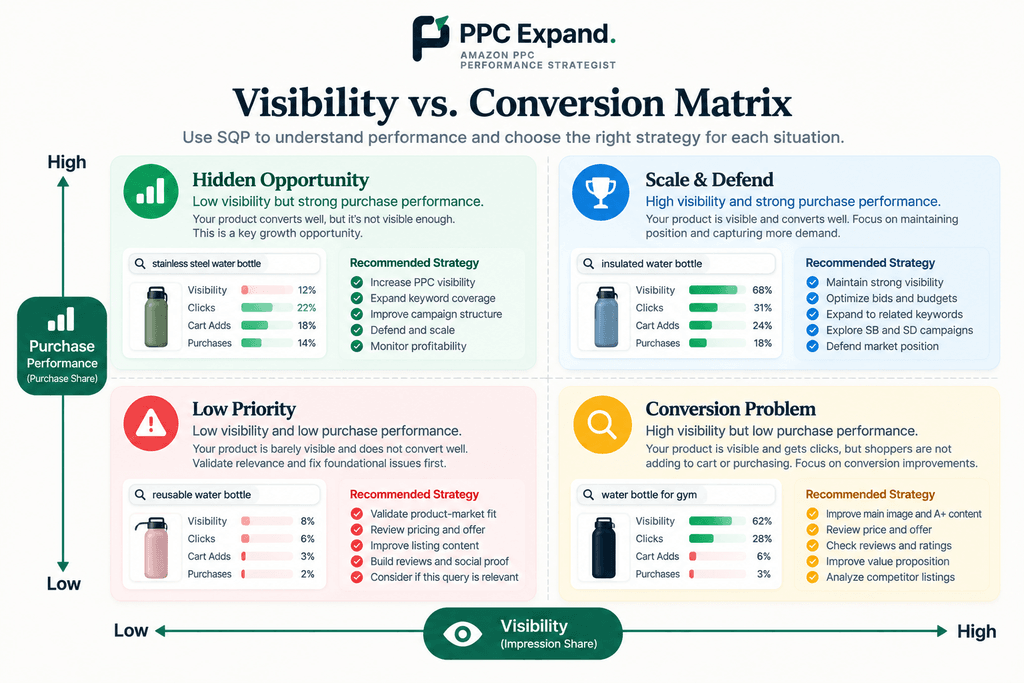
This is one of the most important parts of SQP-based PPC optimization.
Consider two products.
Product A
- Low visibility
- Strong click behavior
- Strong cart behavior
- Strong purchase behavior
This product may have a visibility problem.
Product B
- High visibility
- Strong clicks
- Weak cart behavior
- Weak purchase behavior
This product may have a conversion problem.
Increasing PPC investment for Product B may simply generate more traffic to a product that is not converting effectively.
That is why SQP can be useful before making aggressive PPC changes.
Step 3: Analyze the Search Funnel
A practical SQP analysis should move through the funnel in order.
SEARCH QUERY
      ↓
DEMAND
      ↓
VISIBILITY
      ↓
CLICKS
      ↓
CART ACTIVITY
      ↓
PURCHASES
At each stage, ask a different question.
| Stage | Question |
|---|---|
| Demand | Is the search query commercially meaningful? |
| Visibility | Are we appearing enough? |
| Clicks | Are shoppers choosing our product? |
| Cart | Are shoppers showing purchase intent? |
| Purchase | Are shoppers ultimately buying? |
The answer at each stage determines what you investigate next.
Step 4: Connect SQP With PPC Search-Term Data
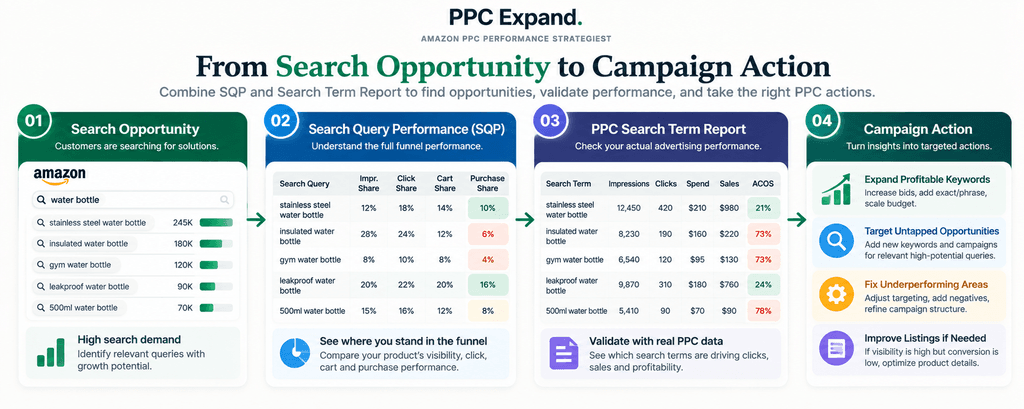
This is where the analysis becomes much more actionable.
Amazon’s Search Term Report is specifically designed to show search terms associated with advertising activity. Amazon states that the report can help advertisers identify high-performing searches and create negative keyword or product targets for search terms that do not meet their goals. The Sponsored Products Search Term Report includes search terms that resulted in at least one ad click.
That gives you a useful two-layer analysis.
| SQP | Search Term Report |
|---|---|
| Search-query opportunity | Advertising activity |
| Broader funnel context | PPC clicks and sales |
| Brand / ASIN performance | Target and search-term performance |
| Potential market gap | Actual paid coverage |
Now you can ask:
“Is my PPC account actually participating in the search opportunity that SQP shows?”
Step 5: Find Underpenetrated Search Queries
An underpenetrated search query is a query where the product appears to have meaningful opportunity but is capturing a relatively limited portion of that opportunity.
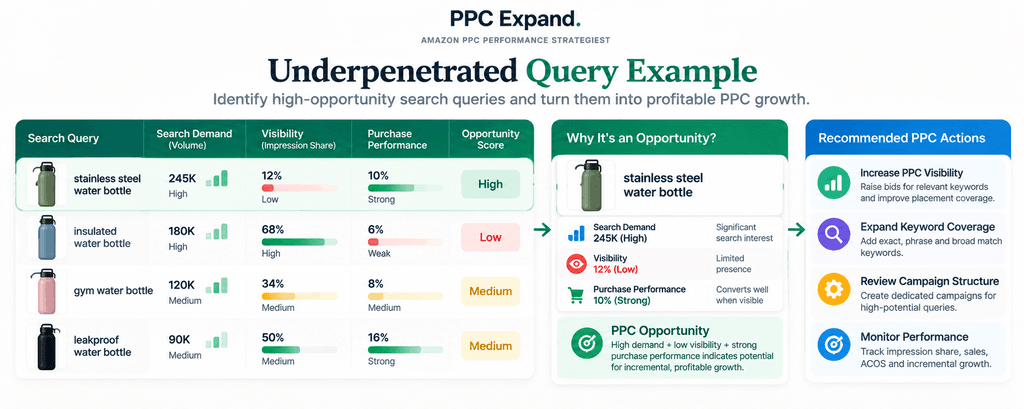
For example:
| Search Query | Demand | Visibility | Purchase Performance |
|---|---|---|---|
| stainless steel water bottle | High | Low | Strong |
| insulated water bottle | High | High | Weak |
| 500ml water bottle | Medium | Medium | Strong |
The first query immediately deserves investigation.
Why?
Because the combination of meaningful demand + low visibility + strong purchase behavior can indicate that the product may be capable of converting additional traffic.
That does not automatically mean “increase bids.”
It means:
Investigate whether additional profitable visibility is available.
Step 6: Check Whether PPC Is Already Covering the Opportunity
Once you’ve identified an interesting search query, check your advertising account.
Look for:
- Exact-match coverage
- Phrase-match coverage
- Broad-match discovery
- Automatic targeting
- Product targeting
- Sponsored Brands coverage
- Sponsored Display coverage where relevant
- Campaign budget limitations
- Placement performance
- Search-term performance
Amazon Sponsored Products uses CPC advertising, and advertisers can choose keywords or allow Amazon’s systems to target relevant keywords automatically.
The objective here is to determine whether the query is:
- Not targeted
- Targeted but receiving little traffic
- Receiving traffic but not converting
- Converting but limited by budget
- Converting but limited by bid competitiveness
- Generating waste that needs refinement
Step 7: Decide Whether the Query Needs More Visibility
Once the query is validated, you can evaluate whether additional PPC visibility makes sense.
There are several possible actions.
Option 1: Increase Bid
This may make sense when:
- The query is highly relevant
- The product converts well
- The economics support additional spend
- The campaign is constrained by competitive bid levels
Option 2: Increase Budget
If campaigns are profitable but frequently budget constrained, additional budget may be more relevant than simply changing bids.
Do not confuse a budget limitation with a bid limitation.
Option 3: Improve Campaign Structure
A valuable search query may be buried inside an overly broad campaign structure.
Depending on the account strategy, you may decide to isolate important search terms into more controlled campaigns.
Option 4: Expand Match-Type Coverage
A search-query opportunity may reveal the need for additional keyword coverage across different match types.
The exact structure should depend on your account architecture and optimization strategy.
Option 5: Improve Organic Coverage
If the query is strategically important, PPC may not be the only solution.
Evaluate whether the listing adequately supports the relevant search intent.
Step 8: Know When NOT to Increase PPC Spend
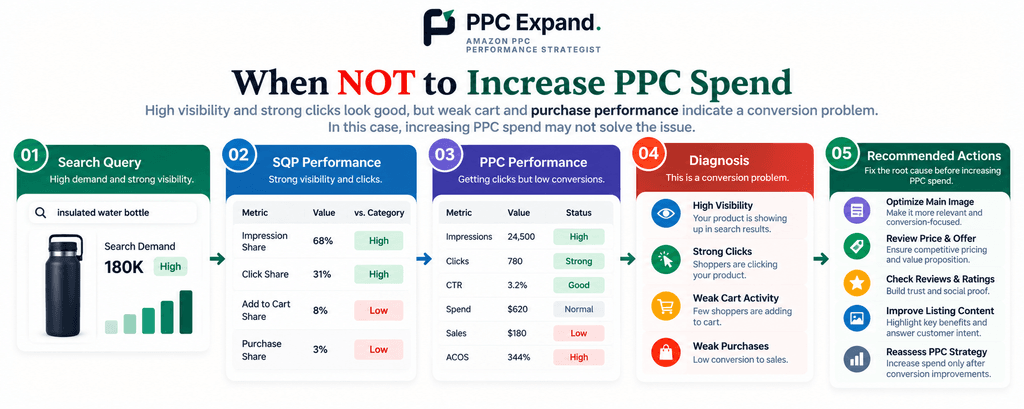
This is just as important as knowing when to scale.
Suppose SQP shows:
- High visibility
- Strong clicks
- Weak cart activity
- Weak purchases
Increasing PPC spend may not solve the problem.
Instead, investigate:
- Price
- Reviews
- Rating
- Main image
- Product-market fit
- Offer quality
- Listing messaging
- Competitive positioning
The problem may be retail performance rather than advertising delivery.
More traffic cannot automatically fix a conversion problem.
Step 9: Use SQP to Improve Keyword Harvesting
Amazon PPC managers often use search-term data to identify successful search terms and move them into more controlled targeting structures.
Amazon itself provides tools and reporting designed to help advertisers identify high-performing targets and refine advertising activity. Amazon’s Target Promotion feature, for example, was introduced to help advertisers promote high-performing targets into more focused structures while refining bids and budgets.
SQP can add another layer to that process.
Instead of asking only:
“Did this search term generate sales?”
you can ask:
“How important is this search query beyond the sales already generated by my PPC campaign?”
This can help distinguish between:
- A profitable search term with limited broader opportunity
- A profitable search term with substantial search opportunity
- A high-volume query with weak conversion
- A strategic query where additional visibility may matter
Step 10: Use SQP to Identify Wasted PPC Spend
SQP is not only a growth tool.
It can also help with diagnosis of inefficient traffic.
Imagine your PPC account is spending heavily around a broad category query, but SQP and retail data indicate that your product is not converting competitively for that query.
You may need to investigate whether the traffic is worth continuing to purchase.
Possible actions include:
- Reducing bids
- Adding negative keywords
- Refining match types
- Reducing budgets
- Moving spend toward stronger queries
- Improving the listing before scaling traffic
The important principle is:
Don’t judge a search query only by its advertising ACOS. Understand the role it plays in the broader funnel.
Step 11: Analyze Branded vs. Non-Branded Queries
Not every search query should be evaluated using the same expectations.
Branded Queries
Branded searches can reflect existing brand awareness and shopper intent.
They may naturally behave differently from generic category searches.
Non-Branded Queries
Non-branded queries can be particularly useful when evaluating category expansion and competitive visibility.
For example:
| Query Type | Example | Potential Strategic Question |
|---|---|---|
| Branded | Brand X water bottle | Are we defending existing demand? |
| Category | stainless steel water bottle | How competitive are we within the category? |
| Feature | leakproof water bottle | Are we capturing feature-driven demand? |
| Use case | water bottle for gym | Are we reaching relevant shopper intent? |
The objective is not to force every query into one PPC strategy.
Different search intents can require different approaches.
Step 12: Turn SQP Insights Into Campaign Actions
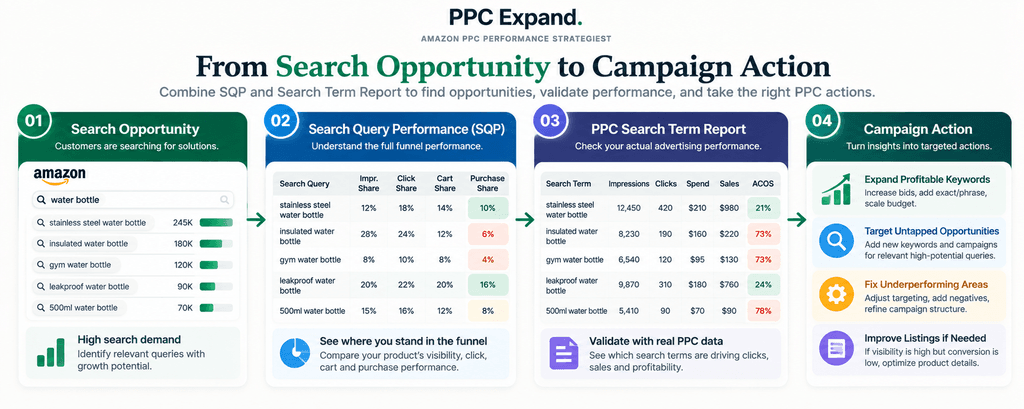
Once the analysis is complete, classify the opportunity.
| Situation | Primary Question | Potential Direction |
|---|---|---|
| Low visibility + strong conversion | Can we profitably capture more traffic? | Evaluate PPC expansion |
| High visibility + weak conversion | Why isn’t the product converting? | Investigate listing / offer / product |
| Strong PPC performance + limited coverage | Is there more relevant demand? | Evaluate expansion |
| High PPC spend + weak funnel | Where is spend being wasted? | Refine targeting and bids |
| Strong purchase performance + strong visibility | Can we defend and scale profitably? | Evaluate incremental growth |
Again, these are decision prompts, not automatic rules.
A Practical SQP-to-PPC Workflow
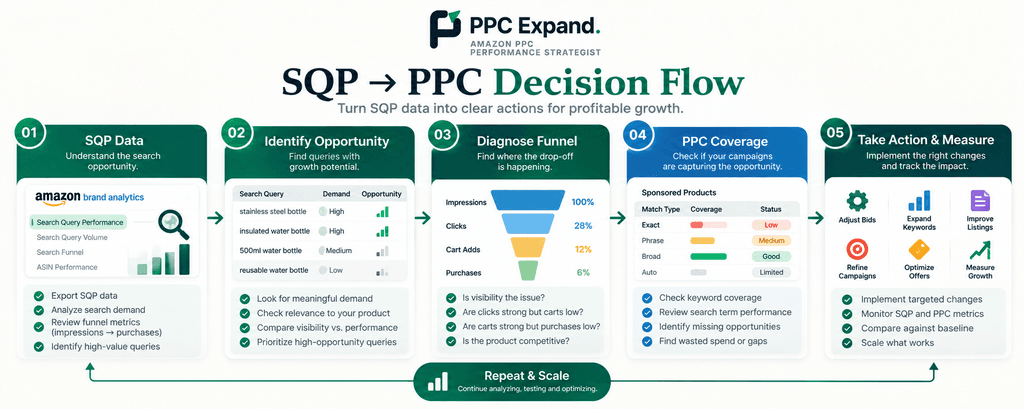
Here is a repeatable workflow that can be used during a monthly PPC analysis.
01  EXPORT SQP DATA
        ↓
02  FILTER IMPORTANT QUERIES
        ↓
03  IDENTIFY OPPORTUNITY GAPS
        ↓
04  CHECK PPC COVERAGE
        ↓
05  REVIEW SEARCH-TERM DATA
        ↓
06  DIAGNOSE FUNNEL
        ↓
07  SELECT PPC / SEO / CRO ACTION
        ↓
08  IMPLEMENT CHANGE
        ↓
09  MEASURE NEXT PERIOD
        ↓
10  REASSESS
Amazon provides downloadable SQP data, including a comprehensive view for selected brands and date ranges and search-funnel outlier data for focusing on particularly high- or low-performing queries.
Example: From SQP Insight to PPC Action
Let’s walk through a simplified example.
Search Query
“stainless steel water bottle”
SQP Observation
- High search demand
- Low product visibility
- Strong click performance when shoppers see the product
- Strong purchase performance
PPC Observation
- Keyword exists in the account
- Exact match is receiving limited impressions
- Campaign is not budget constrained
- Search-term conversion is healthy
Initial Diagnosis
The account may have a visibility constraint rather than a conversion constraint.
Possible Actions to Test
- Review exact-match bid competitiveness
- Review placement performance
- Check whether relevant negatives are blocking traffic
- Review keyword structure
- Evaluate additional campaign coverage
- Monitor organic ranking
What Happens Next?
Do not assume the first change worked simply because impressions increased.
Measure:
- Impressions
- Clicks
- Spend
- Sales
- ACOS
- Conversion rate
- SQP funnel performance
The goal is not simply more traffic.
The goal is more valuable traffic and incremental growth.
How to Measure the Impact of an SQP-Based PPC Change
After making an optimization, compare the relevant period against an appropriate baseline.
Depending on the situation, evaluate:
- Search-query visibility
- Click performance
- Cart activity
- Purchase performance
- PPC impressions
- PPC clicks
- Spend
- Sales
- ACOS
- ROAS
- TACOS
- Organic sales
- Organic ranking
Do not evaluate the change using only one metric.
For example, an increase in impressions may look positive, but if the additional traffic creates disproportionately higher spend without improving sales or contribution margin, the strategy may need to be adjusted.
SQP Optimization Is an Iterative Process
Search-query analysis should not be treated as a one-time project.
A strong PPC process is iterative:
ANALYZE
   ↓
HYPOTHESIS
   ↓
ACTION
   ↓
MEASURE
   ↓
LEARN
   ↓
REFINE
   ↓
ANALYZE AGAIN
This is especially important because search demand, competition, pricing, inventory, reviews, and advertising performance can change over time.
Common Mistakes When Using SQP for PPC
1. Increasing Bids Without Diagnosing the Funnel
Low visibility does not automatically mean a bid problem.
2. Ignoring Conversion Performance
More traffic is not necessarily better if the product does not convert.
3. Looking Only at ACOS
ACOS measures advertising efficiency, but it does not describe the entire search opportunity.
4. Treating All Search Queries the Same
Branded, category, feature, and use-case searches can have very different strategic roles.
5. Ignoring Organic Performance
PPC and organic visibility can influence the overall product growth strategy, so evaluate both where relevant.
6. Making Too Many Changes at Once
If you change bids, budgets, campaign structure, keywords, listing content, and pricing simultaneously, it becomes harder to determine which change affected the result.
7. Forgetting Incrementality
A sale attributed to PPC does not automatically mean that every additional PPC dollar creates an incremental sale.
Always consider the broader business context.
The PPC Expand Approach to SQP Optimization

At PPC Expand, we think of SQP analysis as a bridge between search data and PPC decision-making.
        SEARCH OPPORTUNITY
                ↓
        SQP FUNNEL ANALYSIS
                ↓
        PPC COVERAGE CHECK
                ↓
        SEARCH-TERM ANALYSIS
                ↓
        ROOT-CAUSE DIAGNOSIS
                ↓
       ┌────────┼────────┐
       ↓        ↓        ↓
      PPC      SEO      CRO
       ↓        ↓        ↓
       └────────┼────────┘
                ↓
        MEASURE INCREMENTAL
             IMPACT
This prevents one of the most common mistakes in Amazon advertising:
Using PPC to solve a problem that PPC did not create.
If the issue is visibility, PPC may be part of the solution.
If the issue is conversion, listing or retail optimization may deserve attention first.
If the issue is inefficient targeting, campaign restructuring may be more appropriate.
The data should determine the direction.
Final Takeaway
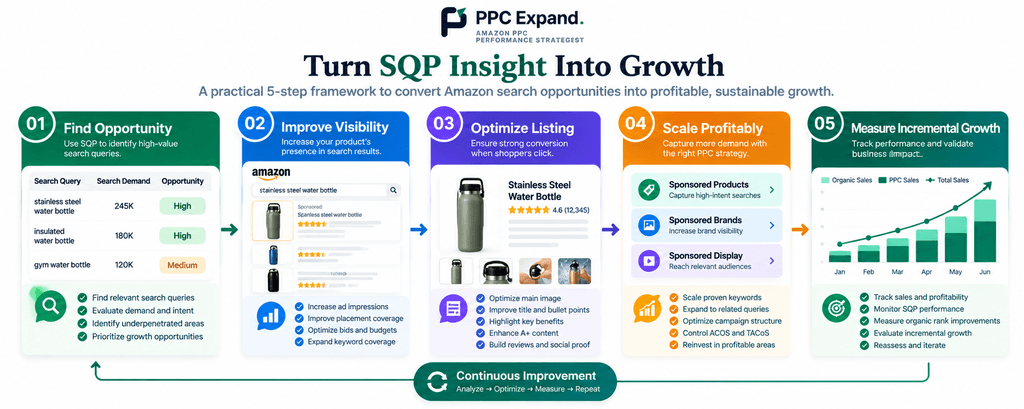
Amazon Search Query Performance becomes significantly more valuable when you stop treating it as another report and start using it as a diagnostic framework.
The process is simple:
Find the search opportunity → diagnose the funnel → compare PPC coverage → identify the gap → take the appropriate action → measure the result.
Sometimes that action will be a higher bid.
Sometimes it will be a larger budget.
Sometimes it will be a new campaign structure.
And sometimes the correct PPC decision is to not spend more and instead fix the product, listing, offer, or conversion problem first.
That is the real value of SQP-based PPC optimization.
Don’t ask only, “How can I get more traffic?”
Ask: “What is preventing this product from capturing more valuable search demand?”
Frequently Asked Questions
Can Amazon SQP be used for PPC optimization?
Yes. SQP can provide search-query and funnel context that can be combined with PPC reports to identify visibility gaps, conversion problems, and potential opportunities for further investigation.
Does SQP tell me what bid I should use?
No. SQP should be treated as a diagnostic source rather than a direct bid recommendation system. Bid decisions should consider relevance, conversion performance, profitability, competition, budget, and campaign-level data.
How do I combine SQP with the Search Term Report?
Use SQP to understand the broader search-query opportunity and funnel performance, then use the Search Term Report to understand how your advertising participated in that search traffic.
Can SQP help me find PPC keywords?
Yes. Relevant search queries can provide useful inputs for keyword research and PPC expansion. However, each query should be validated for relevance, intent, profitability, and product fit before being added to a campaign.
Should I increase PPC spend when SQP visibility is low?
Not automatically. First determine whether the product converts effectively when shoppers reach it and whether additional visibility is likely to create profitable incremental demand.
Can SQP help reduce wasted PPC spend?
It can help diagnose situations where advertising traffic is not translating into strong downstream performance. Combine SQP with search-term, campaign, product, and retail data before making targeting or bid changes.
How often should I use SQP for PPC optimization?
For many established accounts, a monthly deep analysis can be useful, while important queries can be monitored more frequently as part of ongoing PPC management. The appropriate cadence depends on account size, search volume, product lifecycle, and business objectives.