

Amazon PPC optimization is no longer just about looking at clicks, CPC, ACOS, and ROAS.
If you want to understand why a product is gaining or losing visibility for important search queries, you need to look beyond advertising performance and understand what happens throughout the shopper journey.
Table of content
- What Is Amazon Search Query Performance?
- Why Search Query Performance Matters for Amazon PPC
- Amazon Search Query Performance vs. Search Term Report
- What Can You Learn From Amazon SQP?
- The Amazon SQP Search Funnel
- How to Read Amazon Search Query Performance Data
- The Most Important SQP Concept: Share of the Funnel
- How to Use SQP Data for Amazon PPC Optimization
- Example: Finding a PPC Opportunity With SQP
- SQP + Search Term Report: The Powerful Combination
- How to Find Keyword Opportunities With SQP
- How to Use SQP for Amazon SEO
- SQP for Competitor Analysis
- How to Download Amazon Search Query Performance Data
- How to Analyze an SQP Download
- Illustrative SQP Dataset
- The SQP Diagnostic Matrix
- SQP and Amazon PPC: What Action Should You Take?
- The PPC Expand SQP Analysis Framework
- A Real-World SQP Analysis Example
- 7 Ways Amazon Sellers Can Use SQP Data
- Common Amazon SQP Mistakes
- How Often Should You Analyze SQP?
- How SQP Fits Into a Larger Amazon PPC Reporting System
- Final Takeaway
- Frequently Asked Questions
- What is Amazon Search Query Performance?
- Where can I find the Amazon SQP report?
- Who can access Amazon Search Query Performance?
- What metrics are included in Amazon SQP?
- What is the difference between SQP and the Search Term Report?
- Can SQP help with Amazon PPC?
- Can SQP help with Amazon SEO?
- Can I compare my ASIN with competitors using SQP?
- Can I download Amazon SQP data?
- How often should I analyze SQP?
- Should I increase my PPC bids when SQP visibility is low?

That is where Amazon Search Query Performance (SQP) becomes valuable.
Amazon’s Search Query Performance reporting provides brand and ASIN-level insights into how shoppers interact with products for specific search queries. It can help sellers understand search demand, impressions, clicks, cart activity, purchases, and their position within the broader shopping funnel.
More importantly, SQP can connect Amazon PPC, Amazon SEO, conversion optimization, product positioning, and competitive analysis.
In this guide, we’ll explain what the Amazon Search Query Performance Report is, how to read its metrics, how to identify opportunities, and—most importantly—how to turn SQP data into actionable PPC and SEO decisions.
PPC Expand Perspective: Don’t optimize the metric. Diagnose the funnel.
What Is Amazon Search Query Performance?
Amazon Search Query Performance (SQP) is a Brand Analytics reporting tool that helps eligible brand owners understand how their products perform for customer search queries on Amazon.
Instead of looking only at your advertising campaigns, SQP allows you to examine the broader shopping journey associated with a search query.
At a simplified level, that journey can be represented as:
Search → Impression → Click → Cart → Purchase
SQP provides a way to analyze different stages of that funnel at the query, brand, and ASIN level.
This distinction matters.
A PPC report might tell you:
“This keyword generated 25 sales.”
SQP can help you ask a much broader question:
“How is my product performing against the total opportunity represented by this search query?”
That is a very different way of thinking about Amazon growth.
Why Search Query Performance Matters for Amazon PPC
One of the most common mistakes in Amazon PPC analysis is looking at advertising metrics in isolation.
Imagine a keyword is generating:
- Strong clicks
- Good conversion
- Acceptable ACOS
- Positive ROAS
It may appear to be a successful keyword.
But what if your product captures only a small percentage of the total clicks available for that search query?
You could have a profitable campaign and still have significant room to grow.
The opposite can also happen.
A keyword may generate substantial advertising sales while the product’s broader purchase share remains weak.
That can indicate that the opportunity is much larger than the current PPC campaign is capturing—or that the product is not competitive enough to convert additional traffic.
This is why SQP is useful as a diagnostic layer.
The Simplified SQP Funnel
CUSTOMER SEARCH
       ↓
SEARCH QUERY
       ↓
IMPRESSIONS
       ↓
CLICKS
       ↓
CART ADDS
       ↓
PURCHASES
Each stage can tell a different story.
A product can perform well at one stage and poorly at another.
That is why simply looking at ACOS does not always tell you what the real problem is.
Amazon Search Query Performance vs. Search Term Report

These two reports are often confused.
They are not the same thing.
Search Query Performance
Search Query Performance is part of Amazon Brand Analytics and focuses on how your brand or ASIN performs for customer search queries across the shopping funnel.
It can help answer questions such as:
- Which search queries matter most to my product?
- How much search opportunity exists?
- How visible is my product for those queries?
- How much click activity are we capturing?
- How much cart activity are we capturing?
- How much purchase activity are we capturing?
- Which queries deserve additional investigation?
Sponsored Products Search Term Report
The Sponsored Products Search Term Report is an advertising report.
It helps you understand search terms associated with your advertising activity.
Amazon notes that the Sponsored Products Search Term Report can be used to identify high-performing searches and create negative keywords or product targets for searches that do not meet performance goals.
The Simplest Distinction
| Report | Primary Purpose | Main Perspective |
|---|---|---|
| Search Query Performance | Search opportunity and shopping-funnel analysis | Broader search and retail context |
| Search Term Report | Advertising search-term analysis | PPC and paid traffic |
| Campaign Report | Campaign performance | Advertising delivery |
| Advertised Product Report | ASIN advertising performance | Product-level PPC |
| Business Reports | Overall retail performance | Sales and product business |
The real power comes from using these datasets together, rather than treating any one report as the complete picture.
What Can You Learn From Amazon SQP?
SQP becomes much more powerful when you stop looking at individual numbers and start looking for relationships between them.
Scenario 1: High Impressions, Low Clicks
Your product is receiving visibility, but shoppers are not clicking at the same rate as competing products.
Potential areas to investigate include:
- Main image
- Price
- Reviews
- Rating
- Product relevance
- Competitive positioning
- Search-result placement
- Product title and messaging
This is not automatically a PPC problem.
Scenario 2: Strong Clicks, Weak Purchases
Your product is attracting shoppers but struggling later in the funnel.
Potential areas to investigate include:
- Product detail page
- Price competitiveness
- Reviews
- Offer quality
- Product-market fit
- Listing content
- Product expectations versus the actual offer
Increasing PPC bids alone may not solve this problem.
Scenario 3: Strong Purchase Performance but Low Visibility
This can be one of the most interesting opportunities.
If shoppers who reach your product convert well, but your product captures only a relatively small portion of the available search opportunity, the issue may be visibility rather than conversion.
This is where PPC can potentially help capture additional demand—provided the economics support the additional investment.
The Amazon SQP Search Funnel
A useful way to analyze Search Query Performance is to visualize the shopper journey as a funnel.
┌─────────────────────────────┐
│        SEARCH QUERY         │
│                             │
│ "stainless steel bottle"    │
└──────────────┬──────────────┘
               ↓
┌─────────────────────────────┐
│         IMPRESSIONS         │
│                             │
│       Search visibility     │
└──────────────┬──────────────┘
               ↓
┌─────────────────────────────┐
│           CLICKS            │
│                             │
│      Shopper engagement     │
└──────────────┬──────────────┘
               ↓
┌─────────────────────────────┐
│         CART ADDS           │
│                             │
│       Purchase intent       │
└──────────────┬──────────────┘
               ↓
┌─────────────────────────────┐
│         PURCHASES           │
│                             │
│      Final conversion       │
└─────────────────────────────┘
The important point is that each stage can tell a different story.
A product can have strong visibility but weak engagement.
It can have strong engagement but weak purchase performance.
Or it can have relatively low visibility but strong conversion when shoppers reach the product.
These situations require different actions.
How to Read Amazon Search Query Performance Data

Rather than looking at each metric separately, use a funnel-diagnosis approach.
1. Start With Search Query Demand
First determine whether the query represents meaningful demand.
A query with significant search activity may deserve more attention than a query with limited demand—even if the smaller query currently has a better advertising metric.
This helps prioritize opportunities based on potential, not only historical PPC performance.
Ask:
- Is this query highly relevant to the product?
- Is there meaningful search demand?
- Is the query commercially valuable?
- Is the product positioned to satisfy the shopper’s intent?
Do not automatically prioritize the highest-volume query.
Relevance and business value matter.
2. Examine Impression Performance
The next question is:
How much visibility does my product receive for this query?
Low visibility can indicate that there is room to capture more impressions.
For PPC managers, this is where you can begin connecting SQP with:
- Campaign structure
- Keyword targeting
- Bid levels
- Budget availability
- Placement strategy
- Organic ranking
- Product relevance
However, impression performance should not automatically be interpreted as a reason to increase bids.
You need to understand what happens further down the funnel.
3. Analyze Click Performance
Suppose your product receives strong impressions but a relatively small portion of the available clicks.
That creates a different question:
Why are shoppers seeing the product but choosing other products?
Potential explanations can include:
- Main image
- Price
- Rating
- Review count
- Brand recognition
- Product positioning
- Search relevance
- Competitive offers
This is an important distinction:
More impressions do not automatically mean more sales.
If the click stage is weak, increasing advertising spend may simply create more expensive traffic without solving the underlying problem.
4. Analyze Cart Activity
Cart activity provides another layer of insight.
If your product receives clicks but shoppers are not adding it to their carts at a comparable rate, the problem may exist further down the funnel.
High Impressions
       ↓
High Clicks
       ↓
Low Cart Activity
       ↓
Investigate Listing / Offer / Product Fit
This can lead you toward conversion-rate optimization and retail optimization rather than simply PPC optimization.
5. Analyze Purchase Performance
Finally, look at purchases.
If your product captures strong purchase activity relative to its visibility, you may have evidence of strong conversion potential for that search query.
This is where SQP and PPC analysis can become particularly interesting.
Query A
| Metric | Performance |
|---|---|
| Search demand | High |
| Visibility | Low |
| Click performance | Low |
| Cart performance | Strong |
| Purchase performance | Strong |
Potential interpretation: This may represent a visibility opportunity.
Query B
| Metric | Performance |
|---|---|
| Search demand | High |
| Visibility | High |
| Click performance | High |
| Cart performance | Weak |
| Purchase performance | Weak |
Potential interpretation: This may represent a conversion or product-positioning problem.
The important lesson is that the two queries can have similar demand but require completely different strategies.
The Most Important SQP Concept: Share of the Funnel
One of the most useful ways to think about SQP is not:
“Did I get sales?”
Instead ask:
“What percentage of the available shopper opportunity did my product capture?”
This changes the conversation from simple PPC efficiency to market-share analysis.
A PPC campaign might have a 15% ACOS and look excellent.
But if the ASIN captures only a small portion of the search query’s click and purchase opportunity, there may still be room to grow.
On the other hand, a campaign with a higher ACOS may support an important strategic query where the brand is trying to expand visibility.
The correct decision therefore depends on:
- Business objective
- Product economics
- Search-query relevance
- Conversion performance
- Competitive position
- Incremental growth potential
No single SQP metric should automatically dictate a bid or budget change.
How to Use SQP Data for Amazon PPC Optimization

This is where Search Query Performance becomes especially valuable for PPC managers.
At PPC Expand, we recommend connecting SQP analysis with advertising data rather than analyzing either dataset in isolation.
The PPC Expand SQP-to-PPC Workflow
SEARCH QUERY PERFORMANCE
          ↓
IDENTIFY OPPORTUNITY
          ↓
COMPARE WITH PPC DATA
          ↓
DIAGNOSE THE FUNNEL
          ↓
     ┌────┴────┐
     ↓         ↓
VISIBILITY  CONVERSION
     ↓         ↓
PPC ACTION  RETAIL ACTION
     ↓         ↓
     └────┬────┘
          ↓
      RE-MEASURE
This creates a simple decision process:
- Identify an important search query.
- Understand the available opportunity.
- Compare your visibility and funnel performance.
- Check PPC coverage.
- Determine whether the issue is visibility, engagement, conversion, or product competitiveness.
- Take the appropriate action.
- Re-measure the result.
Example: Finding a PPC Opportunity With SQP
Let’s use a hypothetical example.
Imagine a brand sells a 500 mL stainless steel water bottle.
The search query:
“stainless steel water bottle”
has strong demand.
The brand’s ASIN shows:
- Relatively low visibility
- Low click share
- Strong cart performance
- Strong purchase performance
- Competitive pricing
- Good reviews
This creates an interesting hypothesis:
The product may have strong conversion potential but insufficient visibility.
A PPC manager could then investigate:
- Is the search query being targeted?
- Is the relevant keyword present in the appropriate match type?
- Is the keyword isolated appropriately?
- Is the bid competitive?
- Is the campaign budget limiting delivery?
- Are placement adjustments appropriate?
- Are negative targets blocking relevant traffic?
- Is the product ranking organically?
- Is the search term generating profitable PPC sales?
- Is additional traffic likely to be incremental?
Only after answering those questions should the PPC manager decide whether increasing investment makes sense.
SQP + Search Term Report: The Powerful Combination
Think of the two reports as answering different questions.
SQP asks:
What is happening in the overall search opportunity?
Search Term Report asks:
What happened when my advertising participated in that search traffic?
Combining them gives you a much richer picture.
                 SQP
                  ↓
        ┌─────────┴─────────┐
        ↓                   ↓
   Market Demand       Funnel Share
        ↓                   ↓
        └─────────┬─────────┘
                  ↓
             SEARCH QUERY
                  ↓
        SEARCH TERM REPORT
                  ↓
        ┌─────────┴─────────┐
        ↓                   ↓
     PPC Sales          PPC Spend
        ↓                   ↓
        └─────────┬─────────┘
                  ↓
             PPC DECISION
This lets you move from:
“This keyword has a 12% ACOS.”
to:
“This search query has meaningful demand, our product has strong conversion behavior, but our share of the available traffic is limited.”
That is a much more strategic PPC decision.
How to Find Keyword Opportunities With SQP
SQP can also help inform keyword research.
Look for search queries where:
- Search demand is meaningful
- Your product is highly relevant
- Your product receives engagement
- Conversion performance is promising
- Advertising coverage is limited
- Organic visibility is weak
- Competitors capture more of the opportunity
These queries can become candidates for further keyword research and PPC testing.
However, SQP should not replace traditional keyword research.
It should complement it.
A strong Amazon PPC keyword strategy can combine:
- Search Query Performance
- Search Term Reports
- Amazon keyword research
- Amazon autocomplete
- Competitor research
- Product targeting data
- Historical campaign performance
- Business Reports
How to Use SQP for Amazon SEO
SQP is not only useful for PPC.
It can also provide insights for listing optimization.
Suppose you repeatedly identify an important search query that is highly relevant to the product.
You can investigate whether the product’s:
- Title
- Bullet points
- Product description
- Backend search terms
- Images
- A+ Content
adequately communicate relevance and value.
The goal is not to blindly insert every high-volume search query into a listing.
Instead, use SQP to understand how shoppers describe the problem, product, feature, or use case.
That insight can inform your broader Amazon SEO strategy.
Example
Suppose shoppers frequently search for a phrase describing a specific product use case, but your listing focuses almost entirely on a different benefit.
SQP may reveal the mismatch.
The appropriate response may involve:
- Better listing messaging
- Improved imagery
- Keyword coverage
- A+ Content changes
- Product positioning
- PPC testing
rather than simply increasing bids.
SQP for Competitor Analysis
Amazon’s Search Query Details functionality can provide information about leading ASINs associated with a selected search query.
This can help brands benchmark their product against other products appearing for important searches.
Potential comparison areas include:
- Price
- Rating
- Review volume
- Product positioning
- Value proposition
- Product features
- Main image
- Offer structure
Competitor Analysis Workflow
IMPORTANT SEARCH QUERY
          ↓
IDENTIFY TOP ASINs
          ↓
COMPARE YOUR PRODUCT
          ↓
   ┌──────┬──────┬──────┬──────┐
   ↓      ↓      ↓      ↓
 PRICE  REVIEWS  IMAGE  VALUE
   └──────┴──────┴──────┴──────┘
          ↓
      IDENTIFY GAP
          ↓
    PPC / SEO / CRO
The objective isn’t to copy competitors.
It is to understand why shoppers may choose competing products and whether your product has a realistic opportunity to improve its position.
How to Download Amazon Search Query Performance Data
Amazon provides downloadable Search Query Performance data through Brand Analytics.
Depending on the current Amazon interface and account eligibility, available views can include:
- Simple View
- Comprehensive View
- Search Query Details
- Search-funnel outlier data
Because Seller Central interfaces and reporting availability can change, always verify the current options available in your marketplace.
Typical Workflow
Seller Central
      ↓
Brand Analytics
      ↓
Search Query Performance
      ↓
Select Date Range / View
      ↓
Generate Download
      ↓
Download Manager
      ↓
Analyze Data
How to Analyze an SQP Download
Once you have the data, don’t immediately start changing campaigns.
First organize it.
A useful analysis structure is:
| Analysis Layer | Question |
|---|---|
| Demand | How important is this search query? |
| Visibility | How much exposure does the product receive? |
| Engagement | Are shoppers clicking? |
| Intent | Are shoppers adding the product to cart? |
| Conversion | Are shoppers purchasing? |
| Competition | How do competing ASINs perform? |
| Advertising | What is PPC doing for this query? |
| Action | What should change? |
This turns a spreadsheet into a decision-making system.
Illustrative SQP Dataset

The following dataset is illustrative only. It is not Amazon proprietary data and should not be interpreted as an actual Amazon report.
| Search Query | Query Volume | Impression Share | Click Share | Cart Share | Purchase Share | Initial Signal |
|---|---|---|---|---|---|---|
| stainless steel bottle | 100,000 | 12% | 9% | 15% | 18% | Visibility opportunity |
| insulated water bottle | 85,000 | 42% | 38% | 21% | 16% | Investigate conversion |
| 500ml water bottle | 52,000 | 28% | 31% | 34% | 37% | Potential scale candidate |
| reusable water bottle | 125,000 | 8% | 7% | 9% | 11% | Growth opportunity |
| metal water bottle | 45,000 | 35% | 41% | 39% | 42% | Strong performance |
How to Interpret This Example
“Stainless steel bottle”
High demand + low visibility + relatively strong purchase share.
Initial hypothesis: The product may have additional visibility potential.
Investigate PPC coverage, organic ranking, bids, budget, and campaign structure.
“Insulated water bottle”
High visibility + strong click activity + weaker purchase performance.
Initial hypothesis: The bottleneck may be further down the funnel.
Investigate price, reviews, offer quality, listing content, product-market fit, and competitive positioning.
“500ml water bottle”
Strong click, cart, and purchase share.
Initial hypothesis: This query may deserve additional investigation as a potential scale opportunity, subject to profitability and incremental demand.
“Reusable water bottle”
Very high demand but low visibility.
Initial hypothesis: There may be a meaningful growth opportunity—but first validate relevance and product-market fit.
“Metal water bottle”
Strong funnel performance.
Initial hypothesis: Consider protecting the position and evaluating whether additional profitable scale is available.
The SQP Diagnostic Matrix
A useful way to prioritize queries is to compare visibility against purchase performance.
| Low Purchase Performance | High Purchase Performance | |
|---|---|---|
| High Visibility | Conversion Problem Investigate pricing, listing, reviews, offer, and product fit. | Scale / Defend Evaluate profitable growth and competitive protection. |
| Low Visibility | Prioritize Carefully Validate demand, relevance, and product competitiveness. | Visibility Opportunity Investigate PPC and SEO coverage. |
This matrix should be treated as a diagnostic starting point, not an automatic optimization rule.
The rest of the account data still matters.
SQP and Amazon PPC: What Action Should You Take?
The most important step is translating data into an action.
| SQP Signal | What to Investigate | Possible Action |
|---|---|---|
| High demand + low visibility + strong purchase performance | PPC coverage, bids, budget, organic ranking | Test additional visibility |
| High visibility + low click performance | Image, price, relevance, reviews | Improve engagement factors |
| High clicks + weak cart performance | Listing, price, offer, product fit | Investigate conversion |
| Strong cart + weak purchases | Price, availability, offer | Investigate purchase friction |
| Strong purchase share + low PPC coverage | Advertising coverage and profitability | Evaluate PPC expansion |
| High PPC spend + weak funnel performance | Targeting, bids, negatives, product fit | Reduce waste and diagnose root cause |
Notice the language:
“Investigate” and “evaluate” come before “increase bids.”
That’s intentional.
SQP is a diagnostic dataset, not a one-click bid recommendation engine.
The PPC Expand SQP Analysis Framework
At PPC Expand, we can simplify the process into six stages:
1. Demand
Question: How important is this search query?
Look at the search opportunity and relevance.
2. Visibility
Question: Are we visible enough?
Evaluate impression performance and competitive presence.
3. Engagement
Question: Are shoppers choosing to click?
Investigate click performance and the factors influencing shopper attention.
4. Intent
Question: Are shoppers adding the product to their cart?
Identify whether the product is generating meaningful shopping intent.
5. Conversion
Question: Are shoppers purchasing?
Compare purchase performance with the earlier funnel stages.
6. Action
Question: What should we change?
Choose between:
- PPC
- SEO
- Listing optimization
- Conversion optimization
- Product positioning
- Pricing and offer improvements
- Competitive strategy
SEARCH QUERY
      ↓
    DEMAND
      ↓
  VISIBILITY
      ↓
 ENGAGEMENT
      ↓
    INTENT
      ↓
 CONVERSION
      ↓
    ACTION
  /    |    \
PPC   SEO   CRO
This is the core idea behind the PPC Expand approach:
Don’t optimize the metric. Diagnose the funnel.
A Real-World SQP Analysis Example
Let’s look at a simplified scenario.
Suppose a brand analyzes three important search queries.
| Search Query | Demand | Visibility | Click Performance | Purchase Performance | Initial Direction |
|---|---|---|---|---|---|
| stainless steel bottle | High | Low | Low | Strong | Investigate visibility |
| insulated water bottle | High | High | Strong | Weak | Investigate conversion |
| 500ml water bottle | Medium | Medium | Strong | Strong | Evaluate scale |
A traditional PPC report might simply tell you:
“Increase the bid on the first keyword.”
SQP analysis asks a better question:
Why is visibility low, and is increasing PPC investment likely to produce incremental profitable sales?
For the second query, the recommendation may be completely different.
You may already have excellent visibility and clicks.
If purchase performance is weak, simply increasing bids could increase traffic without fixing the underlying issue.
That’s why SQP should be used as a diagnostic framework—not as a bid automation rule.
7 Ways Amazon Sellers Can Use SQP Data
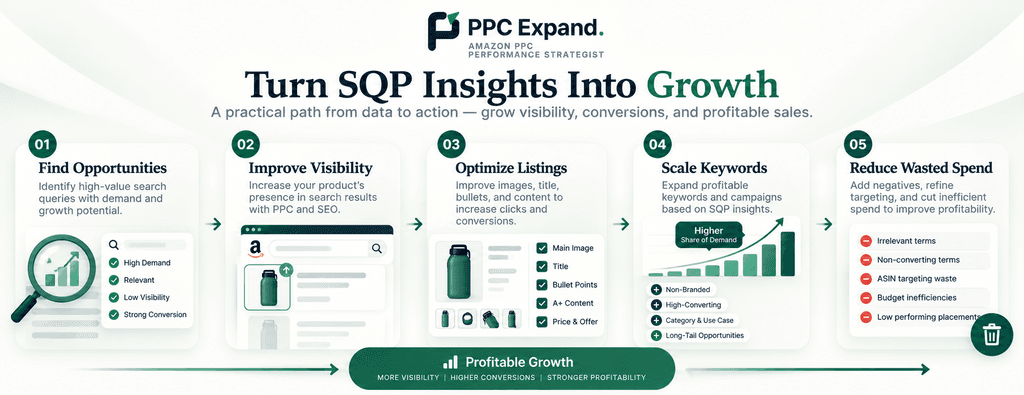
1. Identify High-Value Search Queries
Find search queries that are strategically important to your product and category.
2. Identify Visibility Gaps
Find queries where your product may have room to capture additional search exposure.
3. Diagnose Conversion Problems
Separate traffic problems from product-page, offer, or product-positioning problems.
4. Support PPC Expansion
Use relevant search-query insights to investigate keyword and campaign opportunities.
5. Support Amazon SEO
Use customer search behavior to inform listing relevance and messaging.
6. Benchmark Competitors
Compare your ASIN with leading products associated with important queries.
7. Prioritize Optimization
Focus your team’s time on search queries where the potential business impact is meaningful.
Common Amazon SQP Mistakes
Mistake 1: Treating SQP Like a PPC Report
SQP and advertising reports answer different questions.
Don’t use SQP as a replacement for campaign reporting.
Mistake 2: Optimizing Based on One Metric
A high click share does not automatically mean strong business performance.
Look at the entire funnel.
Mistake 3: Increasing Bids Immediately
A visibility gap does not automatically mean:
“Increase the bid.”
First determine whether the product converts when shoppers reach it.
Mistake 4: Ignoring the Product Detail Page
If impressions and clicks are healthy but purchases are weak, PPC may not be the primary problem.
Mistake 5: Looking Only at Branded Queries
Non-branded search queries can reveal opportunities for category expansion and competitive visibility.
Mistake 6: Treating Every Query Equally
Not every search query deserves the same amount of attention.
Prioritize based on:
Demand × Relevance × Funnel Performance × Business Value
Mistake 7: Assuming SQP Alone Explains Performance
SQP is one part of the Amazon data ecosystem.
For stronger decisions, combine it with:
- Search Term Reports
- Campaign Reports
- Advertised Product Reports
- Business Reports
- Product detail-page data
- Pricing
- Reviews
- Inventory
- Competitive information
How Often Should You Analyze SQP?
There is no universal frequency that works for every account.
For mature accounts with significant search volume, a monthly deep dive can provide a useful strategic view.
For larger accounts, PPC teams may also monitor important queries more frequently and combine SQP with weekly PPC reporting.
The key is consistency.
Instead of downloading SQP once and forgetting about it, create a recurring process:
MONTH 1
   ↓
Collect SQP
   ↓
Identify Opportunities
   ↓
Implement Changes
   ↓
MONTH 2
   ↓
Measure Change
   ↓
Compare Funnel
   ↓
Refine Strategy
This turns SQP from a report into an optimization system.
How SQP Fits Into a Larger Amazon PPC Reporting System
SQP is most valuable when it sits inside a larger analytical framework.
                AMAZON PPC ANALYTICS
                         |
       ┌─────────────────┼─────────────────┐
       ↓                 ↓                 ↓
      SQP           SEARCH TERM       CAMPAIGN DATA
       |                 |                 |
       └─────────────────┼─────────────────┘
                         ↓
                PRODUCT PERFORMANCE
                         ↓
                  BUSINESS REPORTS
                         ↓
                  BUSINESS DECISION
Each report answers a different question.
SQP
What is happening around important search queries?
Search Term Report
What searches are generating advertising activity?
Campaign Data
How efficiently are campaigns delivering?
Product Performance
Which ASINs are generating results?
Business Reports
What is happening to the broader retail business?
The objective is to connect these datasets rather than optimize each one independently.
Final Takeaway
Amazon Search Query Performance is valuable because it moves Amazon advertising analysis beyond:
“How did my campaign perform?”
The more important question is:
“How is my product performing within the search demand that exists around it?”
A strong SQP analysis connects:
Search Demand → Visibility → Clicks → Cart Activity → Purchases → Competition → PPC → SEO → Action
For Amazon advertisers, the goal isn’t simply to generate more clicks.
It is to understand:
- Where the opportunity exists
- Where the funnel is breaking
- Whether the issue is PPC or retail
- Which search queries deserve attention
- Whether additional visibility could create incremental growth
- What action should be tested next
That is where Search Query Performance becomes much more than another Amazon report.
It becomes a decision-making framework.
PPC Expand Perspective
Don’t optimize the metric. Diagnose the funnel.
A low visibility share doesn’t automatically mean you need higher bids. A high click share doesn’t automatically mean your listing is healthy. And a strong ACOS doesn’t necessarily mean you’ve captured the full opportunity.
Use SQP to understand where the opportunity exists, then use PPC, SEO, CRO, and retail data to determine what action makes sense.
Frequently Asked Questions
What is Amazon Search Query Performance?
Amazon Search Query Performance is a Brand Analytics reporting tool that provides search-query-level insights into how brands and ASINs perform throughout the shopping funnel.
Where can I find the Amazon SQP report?
Eligible brand owners can access Search Query Performance through Amazon Brand Analytics in Seller Central. The exact navigation and available reports can vary by marketplace and account eligibility.
Who can access Amazon Search Query Performance?
SQP is part of Amazon Brand Analytics and is generally available to eligible brand owners or representatives. Access can depend on account eligibility, marketplace, and Amazon’s current reporting functionality.
What metrics are included in Amazon SQP?
SQP can provide search-query and funnel information such as search demand, impressions, clicks, cart activity, purchases, and related brand or ASIN performance measures. The exact fields available can depend on the reporting view and Amazon’s current implementation.
What is the difference between SQP and the Search Term Report?
Search Query Performance provides broader search-query and shopping-funnel context, while the Sponsored Products Search Term Report focuses on search terms associated with advertising activity.
Can SQP help with Amazon PPC?
Yes. SQP can provide context around search-query demand and funnel performance that can be combined with PPC data to identify potential visibility opportunities and diagnose whether a problem is primarily related to traffic, engagement, conversion, or product competitiveness.
Can SQP help with Amazon SEO?
Yes. Search-query insights can inform keyword research, listing relevance, messaging, and content optimization. SQP should be combined with other Amazon SEO and retail-performance data.
Can I compare my ASIN with competitors using SQP?
Amazon provides Search Query Details functionality that can show leading ASINs associated with a selected search query and allow comparison with a selected ASIN, depending on the current reporting functionality available to the account.
Can I download Amazon SQP data?
Yes. Amazon provides downloadable Search Query Performance data, including comprehensive data and specialized reporting such as search-funnel outliers, depending on availability.
How often should I analyze SQP?
For many brands, a monthly strategic analysis combined with more frequent monitoring of important queries can be useful. The appropriate frequency depends on search volume, account size, product lifecycle, and business objectives.
Should I increase my PPC bids when SQP visibility is low?
Not automatically. A visibility gap should first be investigated alongside conversion performance, PPC coverage, profitability, budget availability, organic ranking, and competitive factors.